Parallel by default
A worker pool checks repos concurrently: 8 at a time out of the box, tune it with -w.
reposcan is a Git and jj repository scanner. It walks every root you point it at, checks each repo in parallel, and opens a terminal UI listing every one that’s ahead, behind, or sitting on uncommitted changes.
$ curl -fsSL https://raw.githubusercontent.com/mabd-dev/reposcan/main/install.sh | sh
Read the script first · download a binary instead
Clipboard blocked. The command above is selected, press ⌘C or Ctrl+C. Or open the script and run it yourself.
The flows you’ll reach for every day.
Point it at as many roots as you keep code in. A worker pool checks them concurrently (8 at a time by default, tuned with -w), and dirIgnore globs keep node_modules and caches out of the walk.
$ reposcan -r ~/Code -r ~/work
Default to dirty, or pass -f to slice by uncommitted, unpushed, unpulled, or stash. Inside the TUI, / narrows the list without leaving it.
$ reposcan -f unpushed
reposcan discovers .git directories, worktree-style .git files, and .jj repositories in the same pass. Every row carries the VCS it came from, and JSON reports carry a vcsType field so consumers can tell them apart.
[tui] showVCS = true
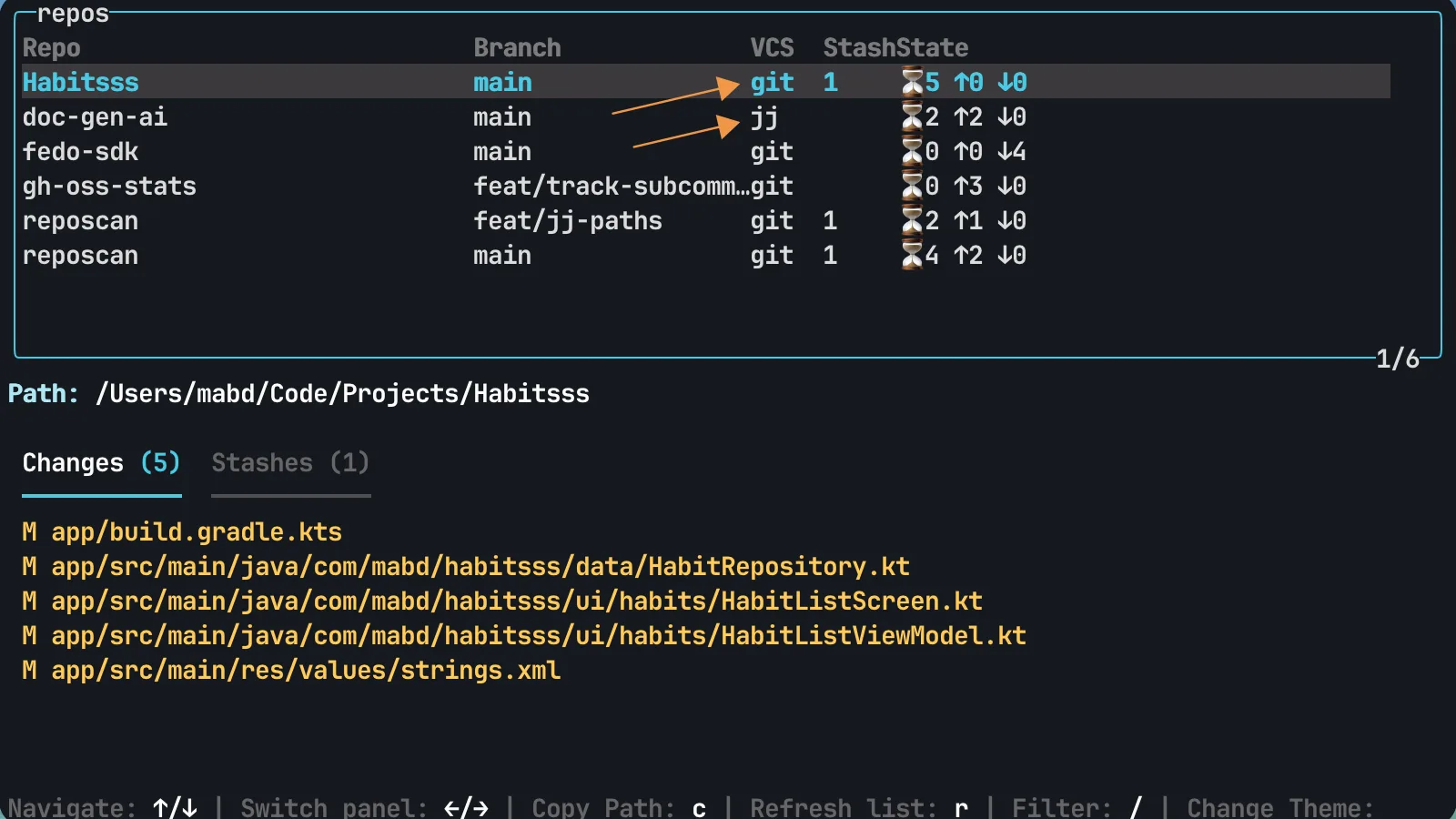
Finding the dirty repo is half the job. c copies the selected repository’s path, r refreshes the list, ? opens the full keymap.
c copy path · r refresh · ? keymap
Everything you’d expect from a tool you run a dozen times a day.
A worker pool checks repos concurrently: 8 at a time out of the box, tune it with -w.
Scans Git worktrees as well as plain checkouts, and finds stash-only work on request: -f stash, or set countStashAsDirty to fold it into the dirty filter.
Emit machine-readable reports for dashboards and CI with a single flag.
-o json
--json-output-path ./outSet your roots, ignore globs, and output format once and they travel with you. CLI flags still override per run.
~/.config/reposcan/
config.tomlThe full flag and config reference lives in the docs.
Uncommitted files, commits ahead of or behind the upstream, and stash entries. By default it lists only dirty repositories; -f switches to uncommitted, unpushed, unpulled, stash or all.
Yes. It discovers .git directories, worktree-style .git files and .jj directories in the same walk. jj support lands in the release after v1.4.1 (build from source to try it now) and reads state only; see the jj notes for its limits.
The install script ships binaries for macOS (Intel and Apple silicon) and Linux amd64. Anywhere else with Go installed, build it from source.
node_modules and caches out of the scan?Pass -d glob patterns, or list them once under dirIgnore in ~/.config/reposcan/config.toml. Doublestar globs such as **/node_modules/** work.
Yes. -o json prints a JSON report to stdout, --json-output-path writes a timestamped report file, and -o none keeps stdout quiet. See the JSON schema.
Anonymous usage data: OS, CPU architecture, tool version, whether it runs in CI, and the flags used. No usernames, tokens or paths. Turn it off with --no-telemetry or no-telemetry = true in the config.
Re-run the install script; it always fetches the latest release. Starting with the release after v1.4.1, reposcan update does the same in place.
Detects your OS and architecture, drops the latest release on your $PATH.
$ curl -fsSL https://raw.githubusercontent.com/mabd-dev/reposcan/main/install.sh | sh
Read the script first · download a binary instead
Clipboard blocked. The command above is selected, press ⌘C or Ctrl+C. Or open the script and run it yourself.
or build from source with go build -o reposcan .